

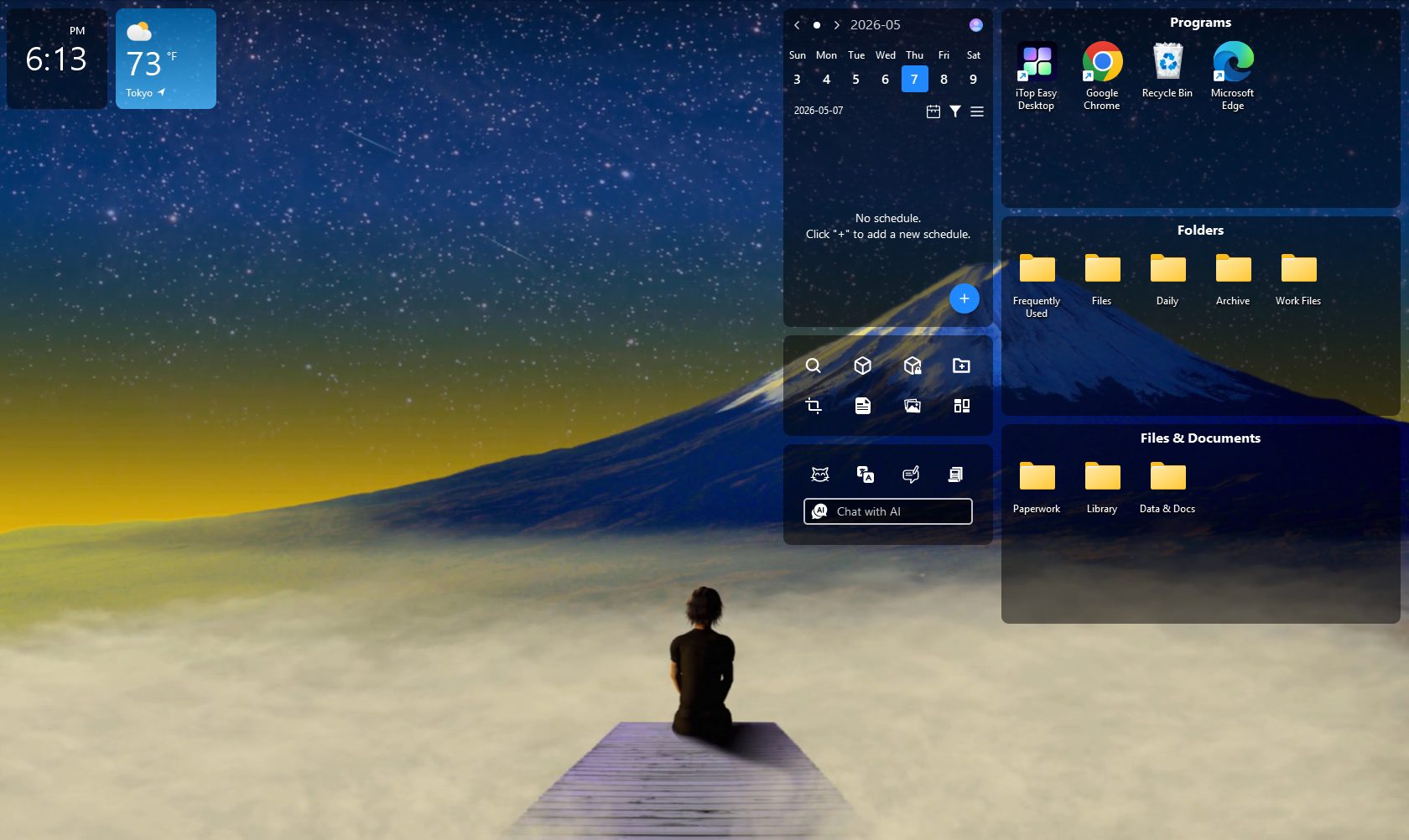
I have a confession to make: my Windows desktop used to be a disaster.
I would save a file there because I needed it “just for now,” download something and forget to move it, and leave shortcuts everywhere because I was convinced I would organize them later. Of course, “later” rarely came. After a few weeks, my desktop was covered with documents, folders, screenshots, installers, and shortcuts that I could barely recognize.
The funny thing is that I knew exactly what I was doing. I had tried creating folders, changing my file-saving habits, and occasionally spending half an hour cleaning everything up. The problem was that none of those solutions lasted very long.
Eventually, I started using iTop Easy Desktop, and it changed the way I organize my PC. What I like about it isn’t simply that it makes my desktop look cleaner. It gives me a place where I can actually keep the things I use every day without turning the screen into a mess.
Here’s how I use it and why it has become my favorite desktop organization tool.
My Desktop Was Getting in the Way
Before iTop Easy Desktop, finding a file could sometimes take longer than the task itself. I might remember that I had downloaded a document but have no idea where I put it. I’d scan through dozens of icons, open a few folders, and eventually resort to Windows Search.
It wasn’t a huge problem on any single day. But when you’re constantly looking for screenshots, work documents, downloads, or shortcuts, those little interruptions add up. I eventually realized that I didn’t need a complicated productivity system. I just needed a better way to arrange the things that were already sitting on my desktop.
That’s where iTop Easy Desktop came in.
The First Thing I Did Was Let It Organize Everything
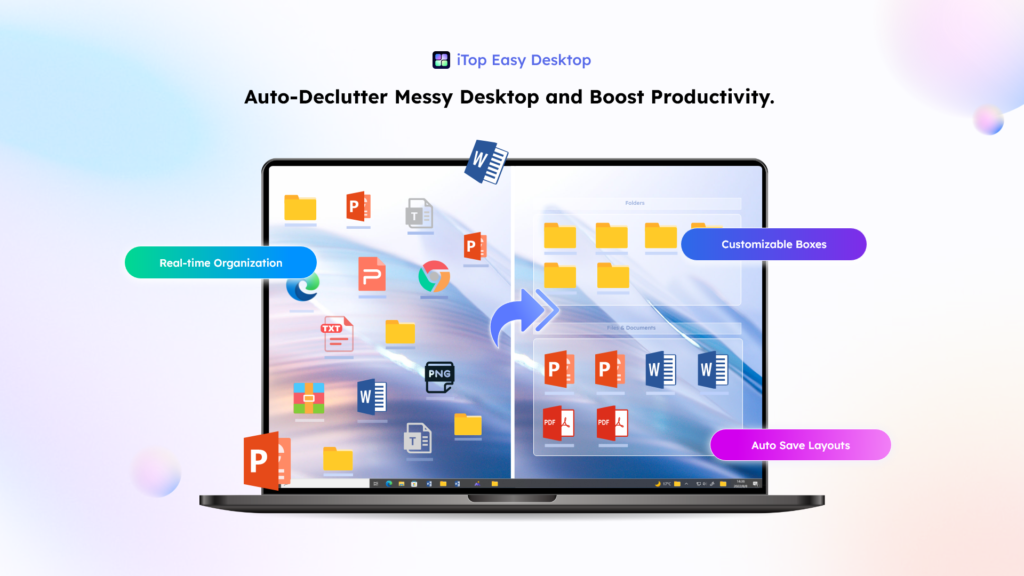
One of the first features I tried was 1-Click Auto-Organization.
Instead of manually dragging every icon into a folder, iTop Easy Desktop can automatically group desktop items into customizable boxes based on their type, such as documents, images, applications, and folders.
The first time I used it, the difference was immediately obvious.
My random collection of icons suddenly had some structure. I could see my files in their own areas instead of having everything spread across the screen.
I still adjusted a few groups afterward because I have my own way of working, but that was much easier than starting with a completely empty desktop and organizing everything manually.
I Created Boxes That Actually Match My Routine
Automatic organization is useful, but the feature I ended up relying on more is customizable Boxes.
I created separate sections for things like work documents, downloads, personal files, and projects I’m currently working on. I can also create boxes based on a particular activity rather than file type—for example, one for gaming and another for work. iTop Easy Desktop allows users to customize these boxes and arrange them around their own workflow.
This sounds simple, but it changed how I use my desktop. Instead of thinking, “Where should I put this file?” I usually already know which box it belongs in. And when a project is finished, I can clean up that entire area without disturbing everything else.
Finding Files Is Much Less Annoying Now
There are still times when I don’t remember where I put something.
That’s when I use the built-in Search. I can type the name of a file or folder instead of scanning through rows of icons. It’s particularly handy when I’m looking for something that isn’t on the desktop anymore but is still somewhere on my PC.
It’s one of those features that doesn’t sound particularly exciting until you’ve spent five minutes looking for a file that should have taken ten seconds to find.
Now I don’t bother searching manually first.
My Desktop Isn’t Just Organized—It’s More Useful
This is probably the biggest reason I kept using iTop Easy Desktop.
It isn’t only about putting icons into boxes. The software also adds a collection of widgets that turn the desktop into a more useful workspace.
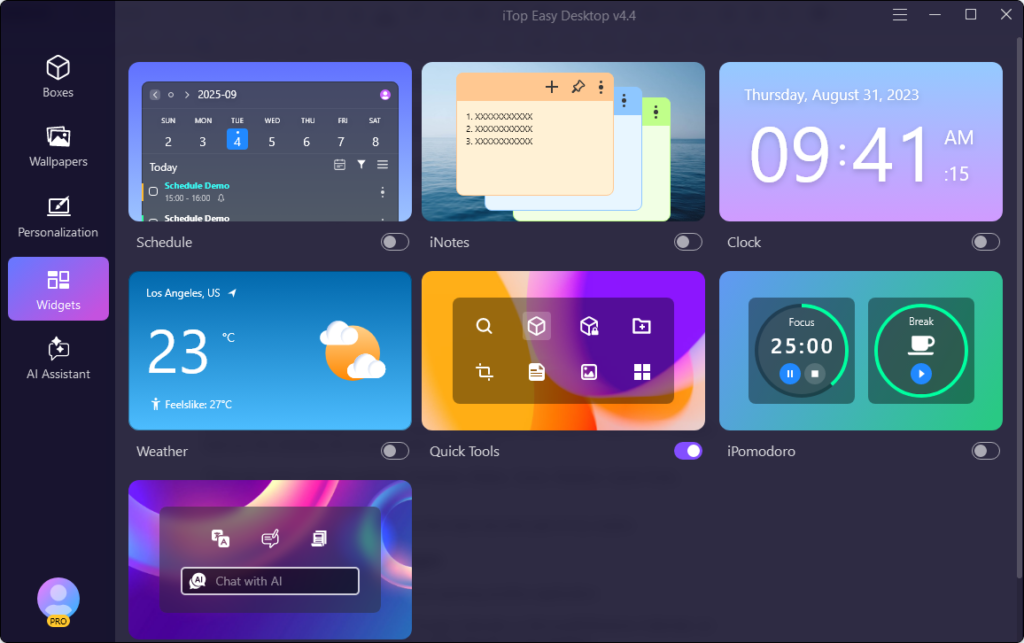
There are seven widgets available: Schedule, iNotes, Clock, Weather, Quick Tools, iPomodoro, and Chat AI.
I don’t use all of them every day, but a few have become part of my routine. I like having my schedule visible on the desktop without opening another app, and the Schedule widget syncs with Google or Outlook Calendar so appointments stay right in front of me—much harder to ignore than a notification. I use iNotes as a digital sticky note to quickly jot down sudden thoughts while working, and its management window lets me browse and search old notes without cluttering my desk with paper. The iPomodoro widget puts a timer on my desktop to break long tasks into focused intervals and short breaks, which makes it easier to actually get started when I’m easily distracted.
I Also Changed How My Desktop Looks
Once everything was organized, I started playing around with the visual side.
iTop Easy Desktop offers a large collection of static and live wallpapers, including more than 22,000 high-definition options according to its current website. I normally prefer simple wallpapers, but occasionally I’ll switch to something more colorful when I get bored with my usual setup. There are also options for changing elements such as the Start Menu, desktop icons, mouse cursor, and themed packs.
I like that these changes don’t require me to completely redesign Windows myself.
Why I Don’t Want to Go Back
I’ve tried plenty of organization methods over the years. The problem was never knowing how to organize my desktop. The problem was maintaining it.
That’s what makes iTop Easy Desktop different for me. It combines automatic organization, customizable boxes, file search, private storage, folder shortcuts, useful widgets, screenshots, wallpapers, and personalization in one place. I don’t have to think of my desktop as just a place where Windows puts shortcuts anymore. It has become more like my personal workspace.
And I don’t have to spend an hour every Friday cleaning it up.
Final Thoughts
I’m not going to claim that iTop Easy Desktop completely changed my life. It didn’t. What it did change was something much more ordinary: the way I interact with my computer every day. My files are easier to find. The things I use most often are where I expect them to be. My schedule and notes are always within reach, and I can quickly hide everything when I need a clean screen.
For me, that’s the real test of a desktop organizer software—if I have to constantly work to stay organized, it isn’t really solving the problem. iTop Easy Desktop lets me set things up once and then get on with my work. That’s why, after trying different ways to organize my Windows desktop, iTop Easy Desktop remains my favorite—and honestly, I don’t feel the need for anything else.
